dApp Framework Tutorial: Deploy and Extend dApps
A tutorial on how to deploy and extend the dApp framework, with a use case for spectrum sharing.
dApps are real-time microservices designed to operate within the O-RAN ecosystem, enabling sub-10 ms Artificial Intelligence (AI) routines in the Radio Access Network (RAN). This tutorial demonstrates how to set up and leverage our dApp framework with OpenAirInterface (OAI) to perform spectrum sharing. Additionally, we provide guidance on how this framework can be adapted to other use cases in 5G and beyond.
The dApp framework is designed for co-location with the CU/DU, where it can interact directly with user-plane data. The modularity of our framework ensures flexibility, allowing developers to tailor it to various spectrum-sharing scenarios or extend it for other AI-driven optimizations in network management. It features:
- Extensibility: Modular design of the classes that can be extended for custom use cases.
- Adaptability: Works with diverse configurations, including over-the-air (OTA) and wireless testing platforms like Colosseum.
- Real-Time Capabilities: Designed to meet the sub-10 ms latency requirements of O-RAN, with control loops periodicity below 1 ms.
Example Application: Spectrum Sharing
The included example demonstrates a dApp for spectrum sharing.
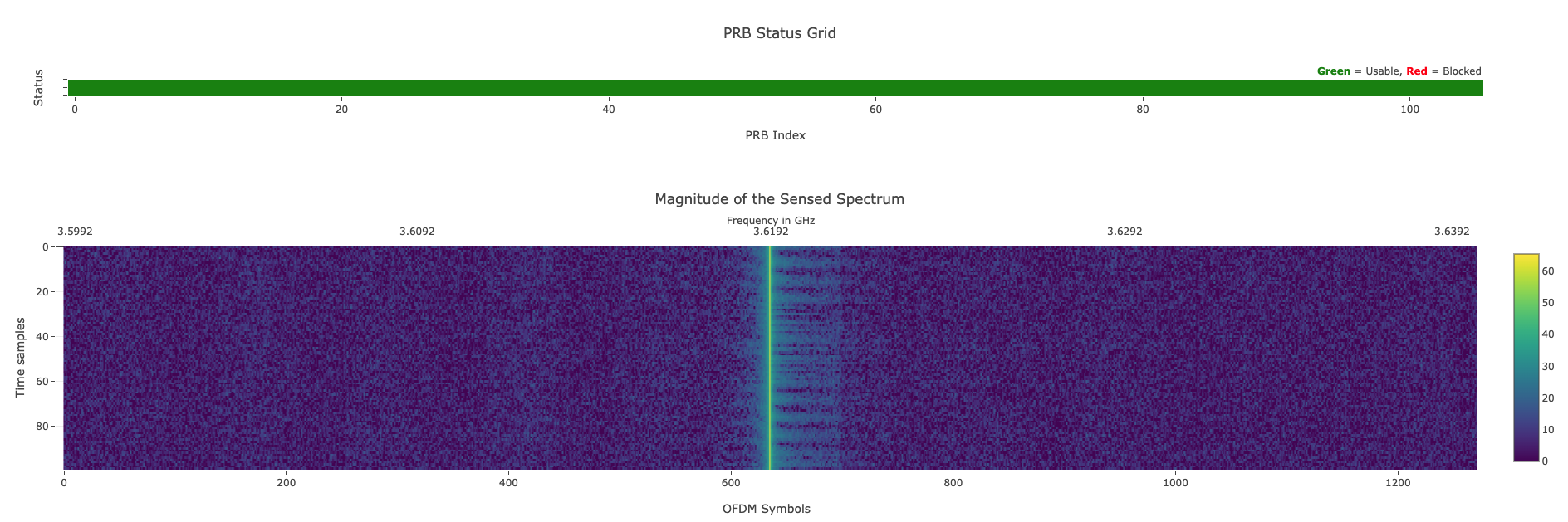
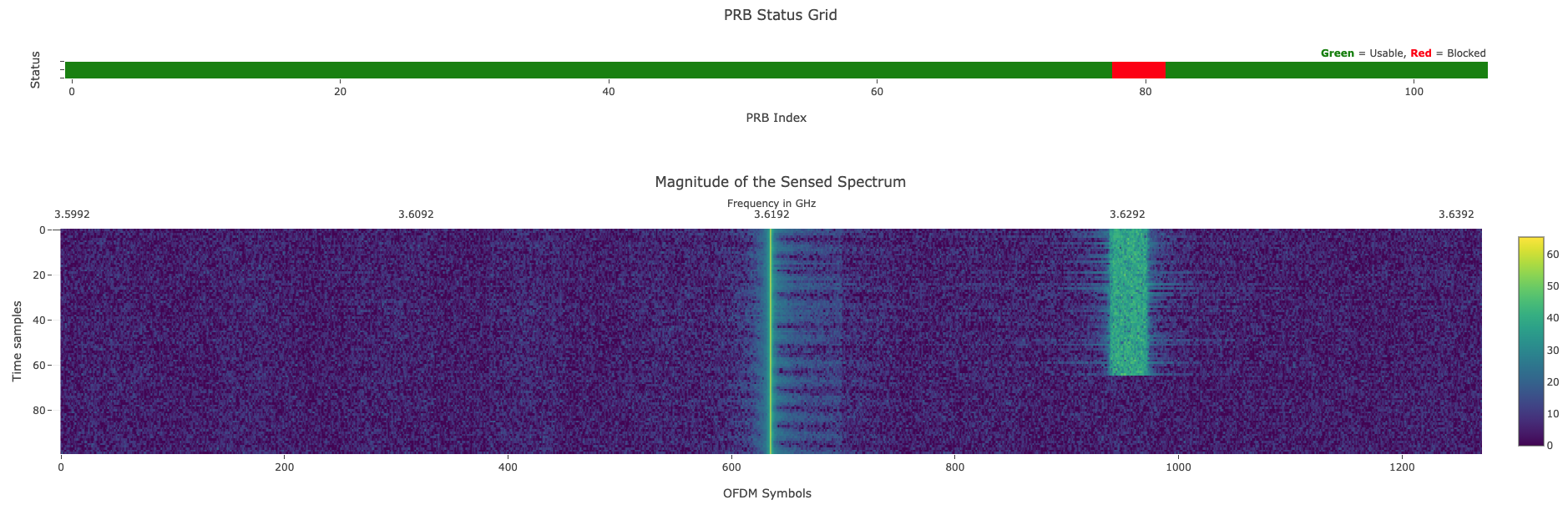
The dApp receives I/Q samples from the gNB, detects the presence of an incumbent signal, and blocks the Physical Resource Blocks (PRBs) affected by interference.
With the --demo-gui flag, a web dashboard visualizes the sensed spectrum in real time.
When an incumbent is detected, the dApp autonomously blocks the affected PRBs:
The same setup can be extended to other use cases, including:
- Dynamic Spectrum Allocation: Implement algorithms to assign PRBs based on real-time traffic demands.
- Spectrum Sensing: Analyze I/Q samples to detect and mitigate interference.
For more information about use cases that benefit from dApps, please refer to the O-RAN nGRG Research Report nGRG-RR-2024-10 and the O-RAN nGRG Research Report nGRG-RR-2025-05 — dApps Architecture and Interfaces v2.0. The E3AP does not need any change and can be used as-is.
Framework Setup
We set up a repository that connects our OAI version and our dApp framework.
Setting Up the dApp
There are two ways to install the dApp library.
Package Installation (Recommended)
Install the dApp library directly from PyPI:
pip3 install dapps[all]
The example dApp can then be downloaded from the dApp-library repository.
Build from Scratch
Use this approach only to make changes to the core library.
Prerequisites: Make sure that python3 is installed in your system, together with the build toolchain for the bundled libiqsaver C++ extension (a C++17 compiler, CMake ≥ 3.16, SWIG ≥ 4.0, and nlohmann/json ≥ 3.11):
sudo apt install cmake swig nlohmann-json3-dev
The dApp library uses the scikit-build-core build backend, which compiles the C++ extension during installation.
Clone the dApp repository:
git clone https://github.com/wineslab/dApp-library dApp
cd dApp
Build and install the Python package (the editable install compiles the C++ extension via scikit-build-core):
pip3 install -e ".[all]"
Setting Up the gNB
Build and install LibE3 — the C++ library implementing the E3 Application Protocol, required by OAI to communicate with the dApp:
git clone https://github.com/wineslab/dApp-libe3
cd dApp-libe3
./build_libe3 -I      # Install dependencies (do it only once)
./build_libe3 --deb   # Build and generate a Debian package
sudo dpkg -i build/libe3-*.deb
cd ..
Clone and Build OAI: Clone the OAI repository and include the --build-e3 flag to enable dApp support:
git clone https://github.com/wineslab/dApp-openairinterface5g openairinterface5g
cd openairinterface5g
source oaienv
cd ./cmake_targets/
./build_oai -I  # Install dependencies (do it only once)
./build_oai -w USRP --ninja --gNB --build-e3
Running the Example
Launch OAI first, before starting the dApp.
The following command is for a USRP X300 radio. An example configuration file for this setup is available gnb.band78.sa.fr1.106PRB.usrpx300.conf.
The flags --T_stdout 2 (redirect gNB logs to stdout) and --gNBs.[0].do_SRS 0 (disable SRS) are mandatory regardless of the RU used:
./nr-softmodem -O <CONFIG_FILE_PATH> --gNBs.[0].min_rxtxtime 6 --sa --usrp-tx-thread-config 1 -E --T_stdout 2 --gNBs.[0].do_SRS 0
If your machine allows, you can preempt the cores using taskset -ca 0-x for enhanced gNB performance.
Then launch the dApp:
python3 examples/spectrum_dapp.py --ota --control --link zmq --transport ipc --demo-gui
Allocate at least one core not preempted by the gNB to the dApp when using taskset.
Finally, start the incumbent on a separate node (e.g., using a USRP) to generate a signal in the gNB spectral context:
uhd_siggen --freq 3.6288e9 --samp-rate 1e6 --gain 70 -m 1 --uniform
The dApp will detect the incumbent and block the affected PRBs automatically.
The --link and --transport values passed to the dApp must match the E3Configuration block in the gNB configuration file. For example, the configuration above corresponds to:
E3Configuration : {
    link = "zmq";
    transport = "ipc";
};
dApp Command-Line Arguments
Connection:
--link: Link layer protocol. Must matchE3Configuration.linkin the gNB config. Options:zmq,posix(default:zmq)--transport: Transport layer. Must matchE3Configuration.transportin the gNB config. Options:ipc,tcp(default:ipc)
Data Collection and Control:
--save-iqs: Save I/Q samples to disk in SigMF format for offline analysis--control: Enable PRB blocking based on detected interference. Without this flag, the dApp can still receive control actions from an external xApp
Spectrum Sensing:
--noise-floor-threshold: Noise floor threshold in dB for incumbent detection. Auto-detected if not specified--ota: Use a pre-calculated noise floor threshold suitable for OTA deployments. Ignored if--noise-floor-thresholdis set. Omit this flag when running on Colosseum
Visualization:
--energy-gui: Enable the energy spectrum GUI (requires X11)--iq-plotter-gui: Enable the I/Q constellation plotter GUI (requires X11)--demo-gui: Enable the web-based real-time spectrum dashboard
Radio Configuration:
--num-prbs: Number of Physical Resource Blocks in the channel (default:106)--num-subcarrier-spacing: Subcarrier spacing in kHz; use30for FR1 sub-6 GHz (default:30)--e: Enable 3/4 FFT sampling mode. Set this flag if the gNB was started with-E--center-freq: Center frequency in Hz (default:3.6192e9)
Execution Control:
--timed SECONDS: Run the dApp for a fixed duration in seconds;0means no limit (default:0)
AI/ML Model:
--model PATH: Path to a pre-trained CNN model file for spectrum classification. Uses rule-based detection if not provided--time-window: Number of consecutive spectrum vectors used as CNN input (default:5)
Signal Processing:
--moving-avg-window: Window size in samples for the moving average filter (default:30)--extraction-window: Samples retained after detecting an energy peak (default:600)--sampling-threshold: Down-sampling ratio; delivers one I/Q vector every Nth sensing cycle (default:5)
Extending the Framework
Our framework can be extended by implementing new E3 Service Models to support different payloads for Indication Messages and control actions, unlocking additional use cases.
The tools/generate_sm.sh script in the dApp-library repository automates the creation of boilerplate code for new service models.
For more information about the dApp architecture and interfaces, please refer to:
- O-RAN nGRG Research Report nGRG-RR-2024-10 — dApp Use Cases and Requirements
- O-RAN nGRG Research Report nGRG-RR-2025-05 — dApps Architecture and Interfaces v2.0
If you use this framework in your work, please cite our paper:
A. Lacava, L. Bonati, N. Mohamadi, R. Gangula, F. Kaltenberger, P. Johari, S. D’Oro, F. Cuomo, M. Polese, and T. Melodia, "dApps: Enabling Real-Time AI-Based Open RAN Control," Computer Networks, pp. 1-31, February 2025. [pdf]
Running on Colosseum
This framework is also available as a ready-made Linux container on the Colosseum wireless network emulator. See the dedicated dApps on Colosseum tutorial for step-by-step instructions.