E2SM-DAPP Tutorial: Enable bidirectional communication between dApps and xApps
A tutorial on how to deploy E2SM-DAPP with dApps and enable xApp-dApp communication
This document proposes a tutorial on how to use E2SM-DAPP to enable bidirectional communication between dApps and xApps.
Overview
In this tutorial we will use the E3 Spectrum Service Model (SM), it provides:
- Indication (Sensing): Collection and forwarding of frequency-domain IQ samples for spectrum monitoring. These are post-FFT, pre-equalization samples collected from the PHY layer, which includes everything that affects the signal.
- Control: Dynamic PRB (Physical Resource Block) blacklisting based on external dApp decisions. Blacklisted PRBs are marked as occupied in the MAC scheduler, preventing any UE or gNB transmissions on those resources.
- xApp-dApp Interaction: Bidirectional PRB-level information exchange between xApp (via E2) and dApp (via E3), enabling coordinated RAN control from both interfaces.
The following diagram shows the closed-loop architecture, where both the xApp and the dApp can independently issue control actions to the RAN while coordinating through the E2-E3 bridge:
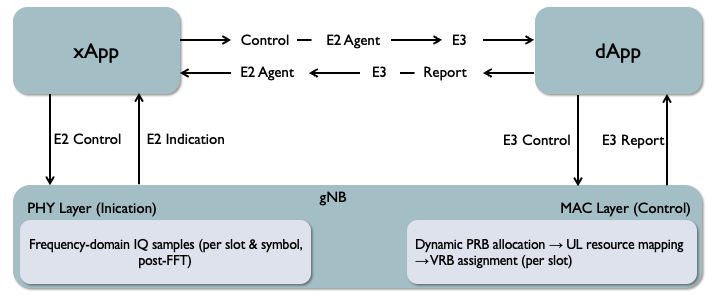
For additional details about the E3 SM used for this tutorial, check Spectrum SM Architecture documentation.
Components that we need
In order to run the demo, we need the dApp-framework repository, that contains the following submodules:
- dApp-openairinterface5g for the gNB and the E3 Agent. Hosts the PHY-layer IQ collection hooks and the MAC-layer PRB blacklisting logic.
- dApp-libe3 for the E3AP encoding/decoding used by the E3 Agent and by dApps.
- dApp-flexric for the E2SM-DAPP. Provides the near-RT RIC, E2 Service Models, and the xApp code.
- dApp-library for the dApp python’s library.
How to setup the tutorial
Clone the repository and add the correct version of flexric inside dApp-openairinterface5g:
git clone https://github.com/wineslab/dApp-framework
cd dApp-framework/
git submodule update --init
cp -r dApp-flexric/* dApp-openairinterface5g/openair2/E2AP/flexric/
Build of dApp-libe3
Build dApp-libe3 to enable the support of the E3AP.
To do that, the best approach is to follow the instructions provided inside the dApp-libe3 README.
Build of dApp-library
Build the python library for the dApps. To do that, execute:
cd dApp-library
hatch build
pip install "$(ls dist/dapps-0.0.*.tar.gz)[all]"
cd ../
Build dApp-flexric
Build the flexric libraries for the RIC, the Service Models and the xApps.
The -DE3_AGENT=ON flag enables the E2-E3 bridge code, so that the xApp-dApp communication its enabled.
cd dApp-openairinterface5g/openair2/E2AP/flexric/
mkdir build
cd build
cmake .. -DE3_AGENT=ON
make -j$(nproc)
make install
ldconfig
cd ../../../../../
Build dApp-openairinterface5g
Build the openairinterface5g repository with the support for both E2 and E3 Agents.
The --build-e2 flag enables the E2 capabilities in the RAN, while the --build-e3 flag enables the E3_AGENT compile flag, which activates IQ sample collection and the dynamic PRB blacklist.
cd dApp-openairinterface5g/cmake_targets
./build_oai --ninja --gNB -w SIMU --build-e2 --build-e3
Prepare the terminals
To run this tutorial, open 5 different terminals. In the following table there is represented the match between the terminal and the command to execute in it.
| Component | Folder | Command |
|---|---|---|
| RIC | dApp-openairinterface5g/openair2/E2AP/flexric/build/examples/ric/ | ./nearRT-RIC |
| xApp | dApp-openairinterface5g/openair2/E2AP/flexric/build/examples/xApp/c/spectrum/ | ./xapp_spectrum |
| gNB | dApp-openairinterface5g/cmake_targets/ran_build/build/ | ./nr-softmodem -O “../../../targets/PROJECTS/GENERIC-NR-5GC/CONF/gnb.band78.sa.fr1.106PRB.usrpx300.conf” |
| dApp | dApp-library/ | python3 examples/spectrum_dapp.py |
| dApp logs | dApp-library/ | tail -f /tmp/dapp.log |
Execute the commands
The order of execution is:
- RIC
- gNB
- dApp logs
- dApp
- xApp
Start one by one the components. When they are over the startup phase, start with the next one, and so on till the last one.
The RIC must be running as first component so that the gNB E2 Agent can connects to it.
The gNB is the second component and must be running before the dApp, so that this last can attach via E3.
Wait a little time and then start the xApp, this way there is time to see the logs of the dApp before the xApp starts sending commands.
What to expect
Before starting the xApp (components 1-4 running)
Once the dApp connects to the E3 Agent, it begins receiving IQ indications from the gNB. The dApp processes these frequency-domain samples and identifies occupied PRBs.
Periodically, the list of identified PRBs will be written in the dApp log, that by default is located at /tmp/dapp.log.
The dApp can then send a control message back through E3 to blacklist those PRBs in the MAC scheduler.
After starting the xApp (component 5)
When the xApp connects and subscribes via E2, the bidirectional bridge activates:
- dApp → xApp: the dApp sends a
Reportthrough the E3 Agent → E2 Agent → xApp path. The xApp should show a message confirming the report was received. - xApp → dApp: the xApp sends a
Controlthrough the E2 Agent → E3 Agent → dApp path. You should see a log that notifies about the arrival of the message with the PRB list from the xApp. - RAN effect: on the gNB terminal, you should see the same PRBs near the
[NR_MAC] Barred_PRBslog output. These PRBs will be excluded from scheduling every slot until the policy is updated.